

























In today’s business landscape, being able to adapt and strategize based on different possible future scenarios is crucial. Scenario planning, an approach that involves predicting various future situations and making plans accordingly, has become an invaluable tool for businesses across industries. Given the inherent uncertainty in business, organizations must prepare for multiple eventualities to mitigate risk and seize potential opportunities.
One of the most robust tools for this kind of strategic foresight is Microsoft Excel. Excel offers a suite of powerful What-If Analysis tools that can help businesses model different scenarios and outcomes, informing their decision-making processes. In this article, we will take a deep dive into these tools, focusing specifically on scenario analysis but also exploring Goal Seek and Data Tables. Whether you’re a seasoned Excel user or a novice, this guide will provide valuable insights into using Excel’s What-If Analysis tools for effective scenario planning.
Table of Contents
Understanding What-If Analysis
Before delving into scenario planning, it’s essential to grasp the concept of What-If Analysis. In essence, What-If Analysis is a process that allows you to test various scenarios and outcomes based on different inputs. It’s akin to asking a series of “what if” questions and using Excel’s tools to find the answers. This process can be instrumental in situations where different variables can significantly impact the final outcome. Excel offers three primary tools for What-If Analysis:
- Scenarios allow you to create and store different groups of values on a worksheet and switch among them for different outcomes.
- Goal Seek is useful when you know the desired outcome but are unsure about the necessary input value.
- Data Tables, on the other hand, show you a range of potential outcomes in a tabular format.
Each tool serves its own purpose, but all three offer a different way to analyze the potential variability in your data, assisting in informed decision-making. Throughout this article, we’ll explore these tools in detail, starting with scenario analysis, the cornerstone of effective scenario planning.
Focus on Scenario Analysis
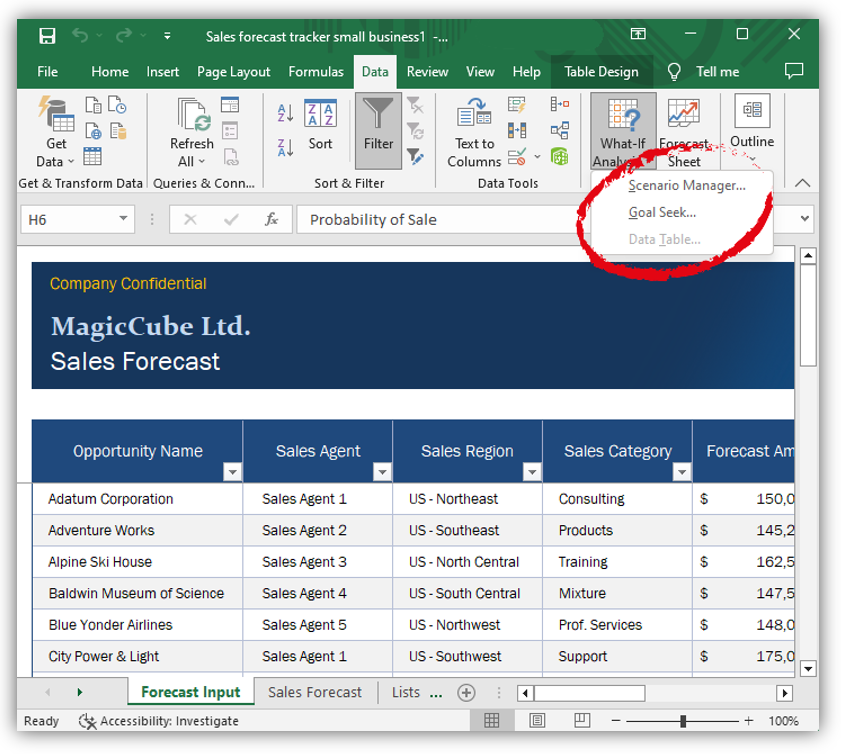
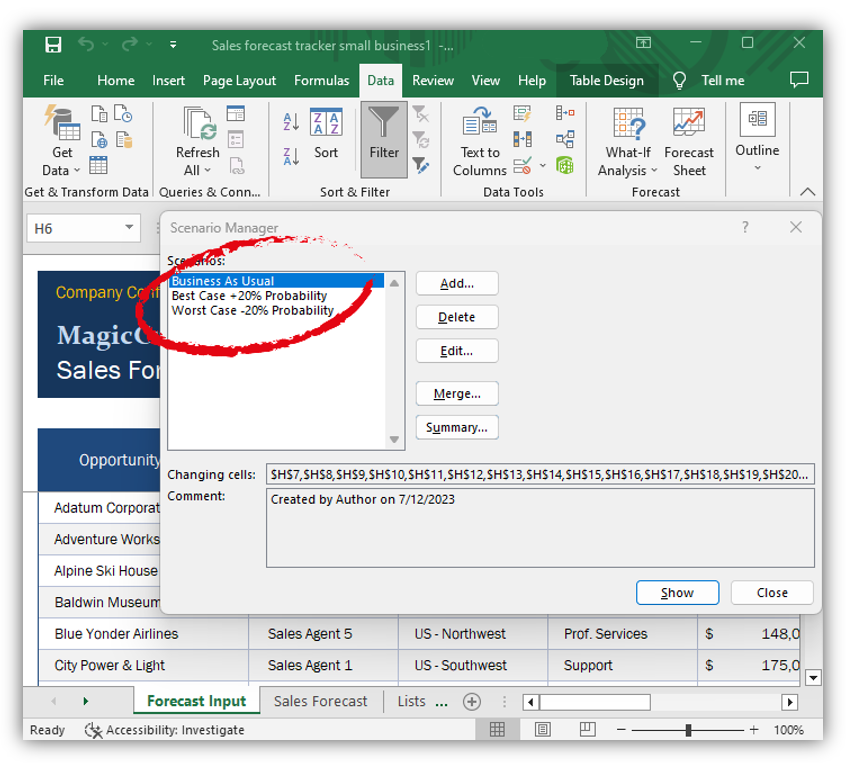
At the heart of robust scenario planning is Scenario Analysis, one of Excel’s key What-If Analysis tools. Scenario Analysis in Excel allows you to construct various hypothetical situations by altering the data in your spreadsheet. Essentially, it’s a way to visualize how different variables can impact your outcomes, thereby helping to shape strategic planning.
Scenario Analysis is particularly valuable when dealing with a large number of variables that could potentially influence your results. By setting up different scenarios, you can seamlessly switch between them to assess the impact of various possible conditions on your outcomes. For instance, you could use Scenario Analysis to model different financial outcomes based on varying interest rates, market conditions, or sales volumes.
Creating a scenario in Excel is straightforward. You begin by selecting the cells that contain the variables you wish to change, then define the different scenarios with specific values for these cells. Excel will store these scenarios, which can then be readily applied to your spreadsheet to visualize different outcomes.
To illustrate this, let’s consider a business case where you need to plan your budget under different sales volumes. In our next sections, we’ll delve deeper into the practical aspects of Scenario Analysis, Goal Seek, and Data Tables, enriching our discussion with hands-on examples.
Deep Dive into Goal Seek
After Scenario Analysis, the next What-If Analysis tool in our exploration is Goal Seek. While Scenario Analysis helps explore potential outcomes based on different variables, Goal Seek has a different purpose. It’s used when you have a target value for a specific formula but doesn’t know what input value will help you achieve it. In essence, it’s the perfect tool when you know your end goal but need help figuring out the path to get there.
Goal Seek works by adjusting one input value to make a given formula equal to a specific target. It’s perfect for scenarios where tweaking one variable can result in achieving your set goal. For instance, if you’re aiming to achieve a certain profit margin, but you’re not sure what sales volume you need to reach it, Goal Seek can answer that question.
Using Goal Seek involves entering the desired result and specifying the cell that contains the formula. Excel then iteratively adjusts the specified input value until it finds a solution. It’s important to note, however, that Goal Seek only manipulates one variable at a time.
In the upcoming sections, we will provide step-by-step instructions on using Goal Seek, along with a practical example to illustrate its utility in business planning. After that, we’ll shift our attention to the third What-If Analysis tool—Data Tables—to continue our deep dive into Excel’s toolkit for scenario planning.

Exploring Data Tables
The third and final tool in Excel’s What-If Analysis suite is the Data Table. This tool stands out for its ability to visualize a range of possible outcomes in one place. While Scenario Analysis allows you to switch between different sets of variables and Goal Seek helps you achieve a specific outcome, Data Tables let you see an array of potential outcomes side by side, based on varying input values.
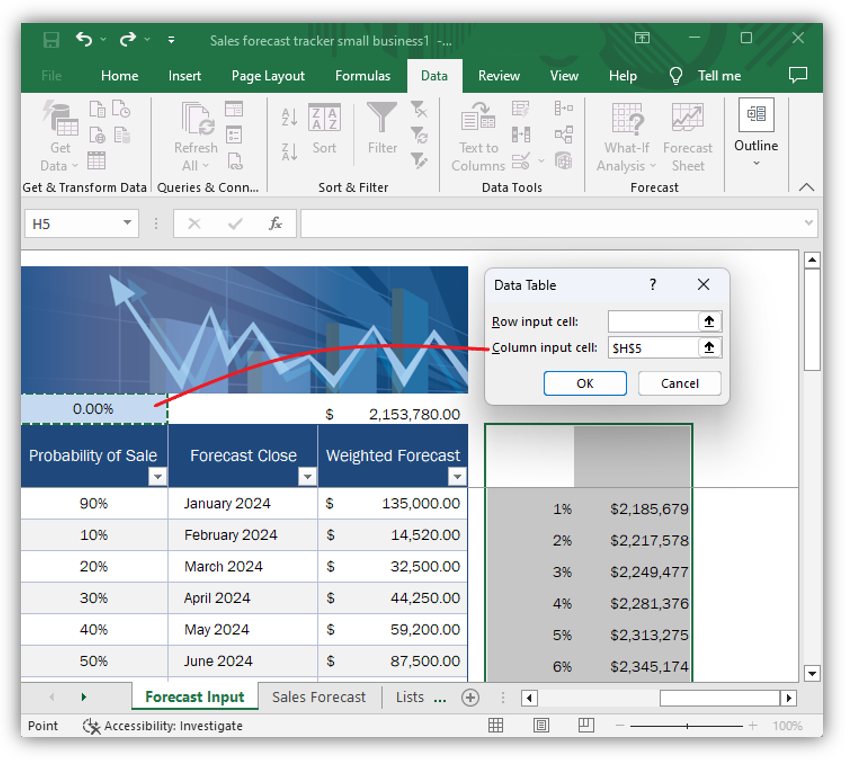
A Data Table in Excel isn’t just a standard table where data is stored. It’s a dynamic tool that lets you explore two-dimensional what-if analyses. For instance, you can vary two inputs and visualize the outcomes in a structured table format. This makes it possible to observe and compare a large number of outcomes at a glance, helping to inform decisions that are dependent on a variety of factors.
Creating a Data Table involves setting up a range of different input values for your variables in a tabular format, then defining the formula or formulas you wish to test. Excel automatically calculates the outcomes for each combination of input values, populating your Data Table with results.
For example, if you’re assessing loan repayment options, you could use a Data Table to see how different combinations of interest rates and repayment periods will affect your monthly payment. In the next section, we’ll go over the process of creating a Data Table in Excel and demonstrate its practical application with a hands-on example.
Through a deeper understanding of these What-If Analysis tools—Scenarios, Goal Seek, and Data Tables—you’ll be equipped to tackle complex business decisions with confidence and precision.
Best Practices for Using What-If Analysis Tools
While the tools of What-If Analysis in Excel are undoubtedly powerful, their effectiveness relies largely on how you use them. To ensure that your scenario planning is as accurate and useful as possible, consider the following best practices:
- Understand your variables: Before diving into any What-If Analysis, ensure that you fully understand the variables in your spreadsheet. Recognize which variables are under your control and which ones are not. This understanding will help you set up more realistic and helpful scenarios.
- Use clear and consistent data: Make sure your data is clean, consistent, and accurately labeled. This is crucial not only for accurate calculations but also for clarity when you revisit your work later or share it with others.
- Don’t overcomplicate: While Excel can handle complex scenarios, it’s often more effective to keep things simple. Start with a few key variables and build from there as necessary. Complex models can be harder to understand and manage, and they might not yield better insights.
- Cross-verify with other tools: While Excel’s What-If Analysis tools can provide valuable insights, they shouldn’t be your only method of analysis. Use them in conjunction with other analytical tools and methods to ensure a comprehensive understanding of potential scenarios.
- Revisit and revise: Business conditions change, and so should your scenarios. Regularly revisit your Scenario Analysis, Goal Seek, and Data Table models to update them with the latest data and business conditions.
- Use caution with Goal Seek: Remember that Goal Seek works with only one variable at a time, and it doesn’t guarantee the optimal solution. Always verify the results and use this tool as part of a broader analysis strategy.
- Validate your models: Always validate your models by testing them with different sets of data to ensure they’re reliable and robust. Be especially cautious about extrapolating results outside of your original data range, as the results can be misleading.
Conclusion
In an ever-changing business landscape, the ability to plan for multiple scenarios is critical to navigate uncertainty and drive strategic decision-making. Microsoft Excel’s What-If Analysis tools—Scenarios, Goal Seek, and Data Tables—offer a robust platform for creating, analyzing, and visualizing these scenarios.
Through Scenario Analysis, we can create and store different sets of variables, allowing us to forecast a range of possible outcomes. With Goal Seek, we’re equipped to back-calculate the required input value to achieve a specific goal. And Data Tables empower us to view a variety of outcomes side by side, adding depth to our analysis.
However, as with any analytical tool, effective usage hinges on a clear understanding of the variables at play, consistent and accurate data, and regular review and revision. These tools are best used in conjunction with other methods of analysis, providing a well-rounded view of potential business scenarios.
As we conclude our deep dive into Excel’s What-If Analysis tools, the key takeaway is that these tools, when used effectively, can be incredibly powerful in informing strategic decision-making. They offer a pathway to mitigate risks, seize opportunities, and navigate the business landscape with confidence and foresight.
Now that you’re armed with this knowledge, it’s time to put these tools into action. Harness the power of What-If Analysis in Excel and unlock new possibilities in your scenario-planning endeavors.
Further Reading / References
For more in-depth information and learning resources on Excel’s What-If Analysis tools, refer to the official Microsoft support page:
- Microsoft Support (n.d.). “Introduction to What-If Analysis”. Retrieved from here.
Please note that as of the last update, the content in this article is accurate. However, Microsoft may update or change its resources, so it’s always a good idea to check for the latest information.
For advanced Excel Forecasting capability, refer to our recent article here. AI-driven Excel Forecasting: Enhanced Data Prediction